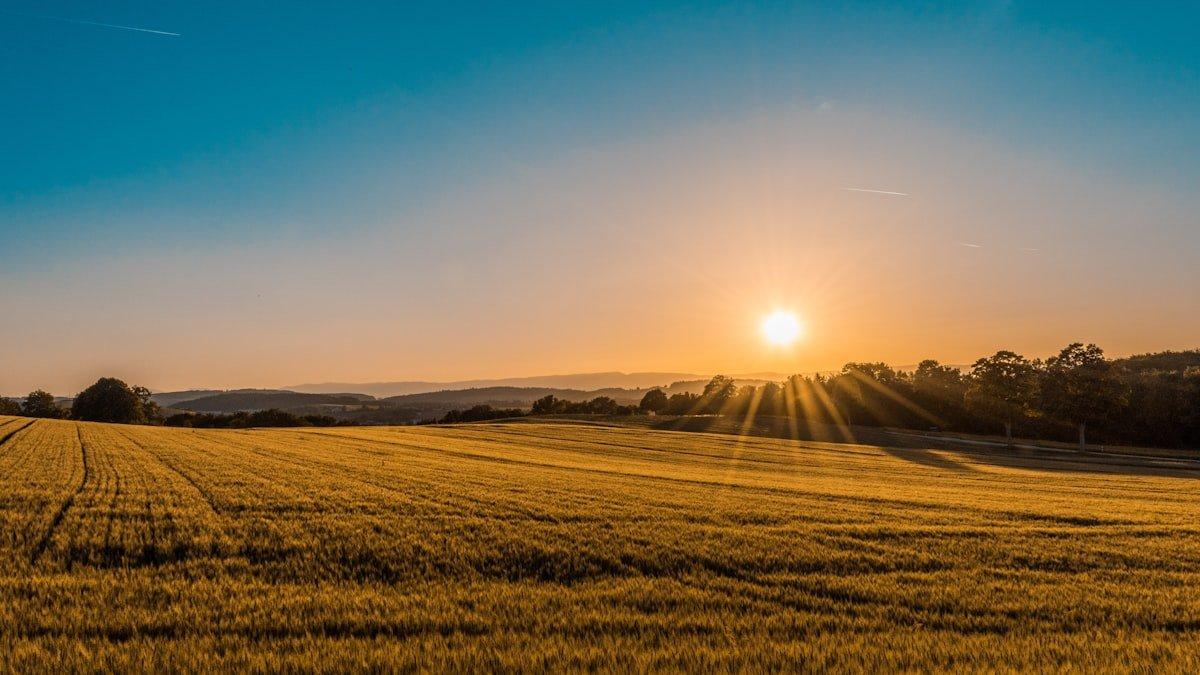
Introduction
There is a moment in every photographer’s development when they realize the shutter speed dial is not just a technical control — it is a creative one. You rotate past 1/60 and keep going. Past one second. Past thirty seconds. And the world you capture looks nothing like the world you see.
Long exposure photography reveals motion the human eye cannot perceive. Water becomes silk or glass. Clouds streak into paintbrush strokes across the sky. Crowds of tourists vanish from a plaza, leaving architecture in ghostly solitude. Light trails from vehicles trace arterial paths through cities. Stars carve arcs across the celestial sphere.
But the gap between understanding the concept and executing it consistently in the field is wider than most tutorials suggest. Long exposure demands precise gear selection, exposure calculation under pressure, and an understanding of how different durations produce radically different effects. This guide covers all of it — from choosing the right ND filter to stacking star trails, with the settings tables and calculation methods you will actually use on location.
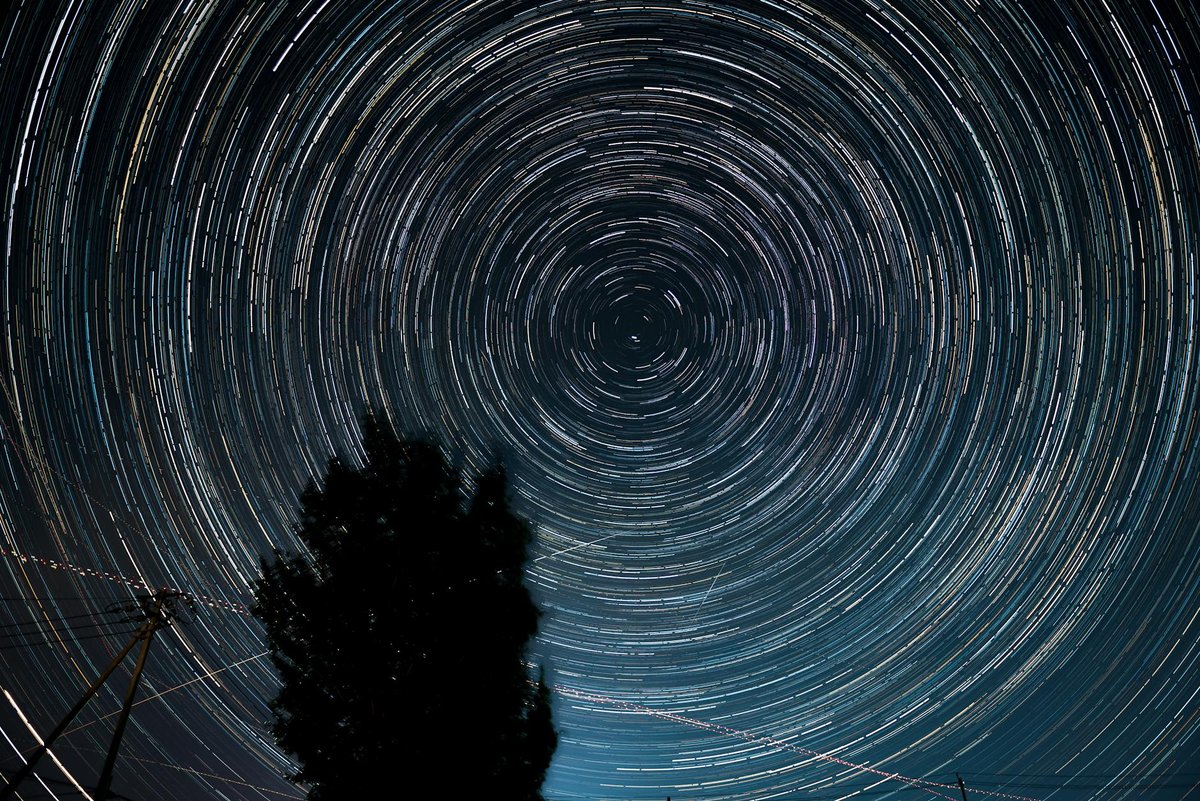
Star trails reveal Earth’s rotation — stack 200+ exposures of 30 seconds each for smooth, continuous arcs without hot pixels
Essential Gear for Long Exposure
ND Filters: Your Light Reduction Toolkit
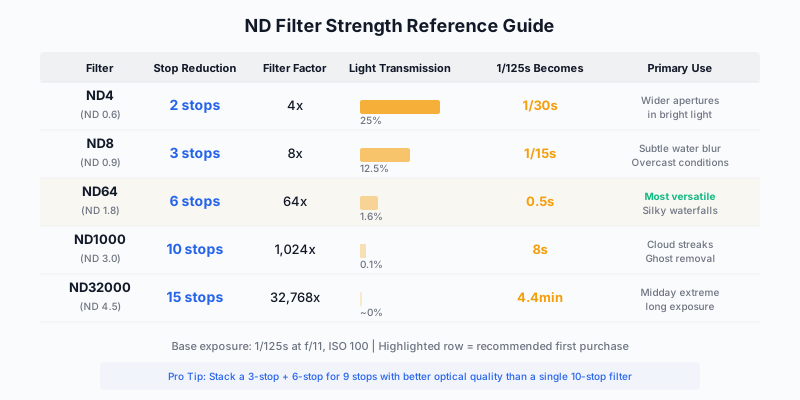
Neutral density filters are the foundation of daytime long exposure. They reduce the light entering your lens by a predictable amount, allowing shutter speeds that would otherwise blow out the image.
| Filter Strength | Light Reduction | Stops | Typical Shutter Speed Effect | Primary Use |
|---|---|---|---|---|
| ND8 | 8x | 3 stops | 1/125 → 1/15 sec | Subtle water blur, portrait motion |
| ND64 | 64x | 6 stops | 1/125 → 0.5 sec | Classic waterfall silk, moderate cloud blur |
| ND1000 | 1,024x | 10 stops | 1/125 → 8 sec | Cloud streaking, crowd removal, smooth water |
| ND32000 | 32,768x | 15 stops | 1/125 → 4 min | Extreme midday long exposures |
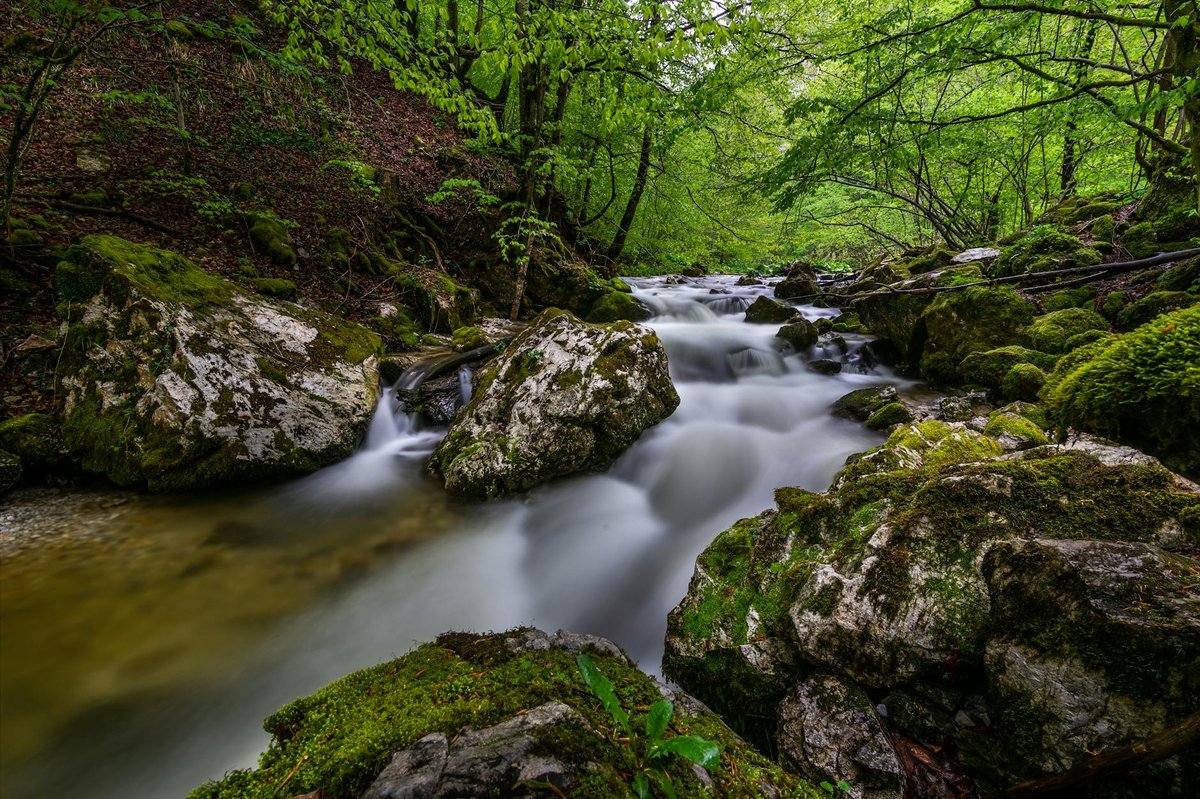
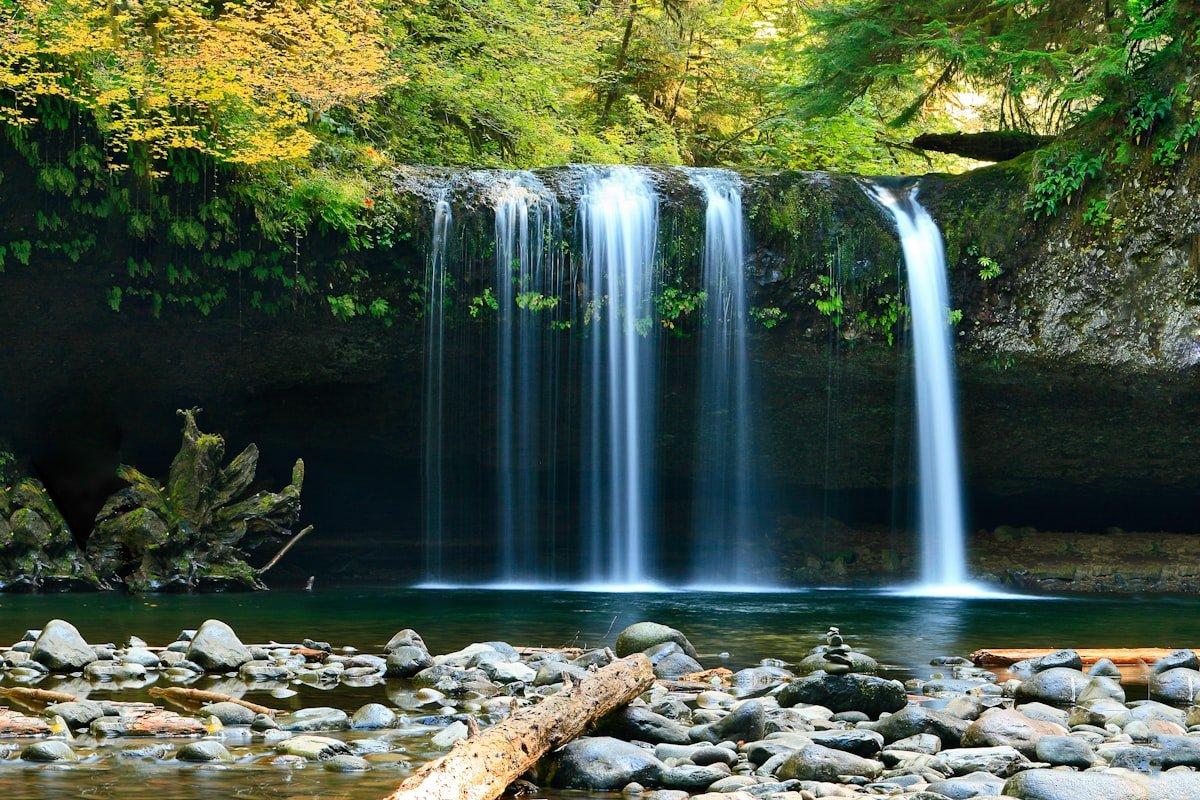
The classic long exposure waterfall — 1 to 4 seconds transforms turbulent water into silk while keeping surrounding rock and foliage sharp
The Case Against Cheap ND Filters
Not all ND filters are created equal. Budget filters introduce color casts (usually magenta or brown), reduce contrast, and can create uneven density across the frame. The difference between a $30 filter and a $150 filter is not subtle — it is the difference between a usable image and one that requires heavy correction just to look neutral.
Recommended filter systems for serious long exposure work:
| Brand | Type | Strength | Notes |
|---|---|---|---|
| NiSi | Square (100mm) | 6-stop, 10-stop | Minimal color cast, excellent coating |
| Lee Filters | Square (100mm) | Big Stopper (10), Super Stopper (15) | Industry standard, slight warm cast |
| Breakthrough Photography | Circular screw-on | 3, 6, 10 stop | Best circular options, near-neutral |
| Hoya ProND | Circular screw-on | 3, 6, 10 stop | Good value, slight cool cast |
The Stacking Question
Many photographers stack a 3-stop and 6-stop filter to get 9 stops, or a 6-stop and 10-stop for 16 stops. This works, but stacking introduces risks: increased vignetting (especially on wide-angle lenses below 24mm), potential for light leaks between filters, and compounded color casts. If you shoot long exposure frequently, invest in single filters at the strengths you use most rather than relying on stacks.
Other Essential Gear
- Sturdy tripod: This is not the place for a travel tripod. Wind vibration during a 30-second exposure destroys sharpness. Carbon fiber legs dampen vibration better than aluminum. Hang your bag from the center column hook for additional stability.
- Remote release or intervalometer: Any physical contact with the camera during exposure introduces shake. A cable release or wireless trigger is mandatory. For star trails, you need an intervalometer that can fire hundreds of sequential exposures.
- Lens hood: Light hitting the front of an ND filter at an angle creates flare and reduces contrast. Always use a hood, and for extreme exposures, shield the filter with your hand or a dark cloth.
- Gaffer tape: Seal light leaks around square filter holders. Light entering from behind the filter during very long exposures causes streaks and uneven exposure.
- Viewfinder cover: Light entering through the optical viewfinder (on DSLRs) during long exposures creates light leaks. Cover it, or use Live View.
Exposure Calculation: The Math You Need
The Doubling Method
Each stop doubles the exposure time. This is the fundamental calculation:
Starting exposure (no filter) at f/11, ISO 100: 1/125 second
| Filter | Calculation | Result |
|---|---|---|
| 3-stop | 1/125 → 1/60 → 1/30 → 1/15 | 1/15 sec |
| 6-stop | Continue: → 1/8 → 1/4 → 1/2 | 0.5 sec |
| 10-stop | Continue: → 1 → 2 → 4 → 8 | 8 sec |
| 15-stop | Continue: → 16 → 32 → 64 → 128 → 256 | ~4 min |
The Quick Reference Table
Memorize or print this table for field use. It shows the filtered exposure for a given base exposure and filter strength.
| Base Exposure | 3-stop | 6-stop | 10-stop | 15-stop |
|---|---|---|---|---|
| 1/500 sec | 1/60 | 1/8 | 2 sec | 1 min |
| 1/250 sec | 1/30 | 1/4 | 4 sec | 2 min |
| 1/125 sec | 1/15 | 1/2 | 8 sec | 4 min |
| 1/60 sec | 1/8 | 1 sec | 15 sec | 8 min |
| 1/30 sec | 1/4 | 2 sec | 30 sec | 16 min |
| 1/15 sec | 1/2 | 4 sec | 1 min | 32 min |
Using Apps for Calculation
PhotoPills and the NiSi Filters app both include ND calculators that handle the math instantly. Meter the scene without the filter, input your base exposure, select your filter strength, and the app gives you the filtered duration. In the field, speed matters — use the app.
Reciprocity Failure (Film Shooters)
Digital sensors respond linearly to light regardless of exposure duration. Film does not — at very long exposures, film loses sensitivity and requires additional compensation. If you shoot film, consult the reciprocity data for your specific emulsion. For digital shooters, this is not a concern.
Waterfall Photography: The Signature Long Exposure
Shutter Speed and Its Effect on Water
The relationship between shutter speed and water appearance is not linear. Small changes at fast speeds produce large visual differences, while at very slow speeds, additional seconds have diminishing effect.
| Shutter Speed | Water Appearance | Best For |
|---|---|---|
| 1/500 and faster | Frozen droplets, splash detail | Powerful falls, crashing waves |
| 1/15 - 1/4 sec | Texture preserved, directional blur | Cascades with complex flow patterns |
| 1/2 - 2 sec | Classic silk effect, smooth threads | Most waterfall photography |
| 4 - 15 sec | Ethereal mist, cotton-like | Single-thread falls, gentle cascades |
| 30+ sec | Complete abstraction, solid white | Minimalist, graphic compositions |
The Sweet Spot
For most waterfall photography, the 0.5 to 2 second range produces the most visually appealing result. Long enough to smooth the water into flowing silk, short enough to retain the directional texture that communicates movement. This is where a 6-stop ND filter earns its place in your bag.
The Two-Shot Blend Technique
Capture one exposure optimized for silky water (long exposure with ND filter) and another shorter exposure for sharp surrounding rock, moss, and foliage. Blend in Photoshop using luminosity masks or a simple layer mask. This gives you ultimate control — silk-smooth water without the loss of micro-detail in stationary elements that long exposures sometimes cause through subtle tripod vibration.
Field Tips for Waterfalls
- Arrive early for wet rocks: Spray and mist from waterfalls creates naturally saturated colors on surrounding rock, but direct sun dries surfaces and creates harsh contrast. Overcast days or shade are ideal.
- Use a polarizer with your ND: A circular polarizer removes reflections from wet rock and foliage while adding approximately 1.5 stops of light reduction. Factor this into your exposure calculation.
- Watch for spray on your filter: Mist accumulates on the front element during long exposures. Check and wipe between shots. A single water droplet creates a bright star-shaped artifact.
- Compose for flow: The viewer’s eye follows the water’s path. Use this as a leading line that draws attention through the frame to your focal point.
Seascape Long Exposure
Reading the Ocean Before Shooting
Spend at least 10 minutes watching before you mount the camera. Note:
- Wave interval: How many seconds between wave sets? Time your exposure to capture complete cycles.
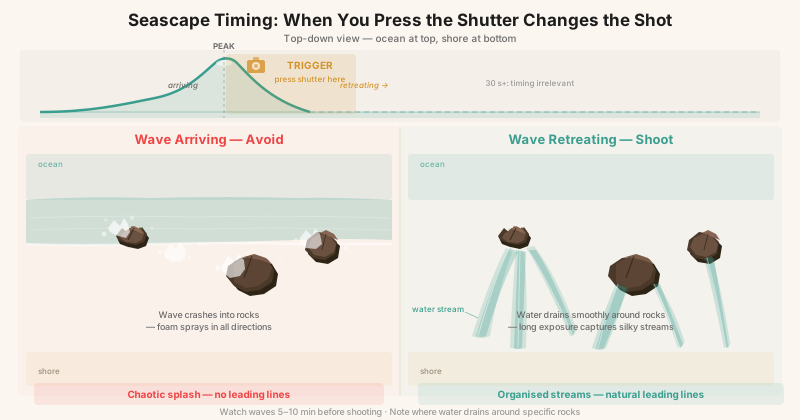
- Receding water patterns: As waves retreat over rocks, they create fan-shaped flow patterns that make compelling foreground elements.
- Foam accumulation: Where does foam collect? These areas create white streaking in long exposures.
- Tidal direction: Is the tide coming in or going out? This changes the energy and pattern of water movement over the next hour.
Shutter Speed Selection for Seascapes
| Shutter Speed | Ocean Effect | Compositional Character |
|---|---|---|
| 1/4 - 1 sec | Dynamic motion, individual waves readable | Energy, drama, power |
| 2 - 8 sec | Smooth flow around rocks, wave trails visible | Ethereal but active |
| 15 - 60 sec | Mirror-smooth water, fog-like | Minimalist, meditative |
| 2 - 5 min | Completely flat water, cloud streaks | Abstract, graphic |
The diagram below captures the single most important seascape technique: the direction of water movement when the shutter opens determines whether you get organised leading lines or chaotic foam.
The In-Between Danger
Exposures in the 3-8 second range at the ocean are often the hardest to get right. Too long for individual wave drama, too short for complete smoothing. The result can look neither dynamic nor serene — just blurry. Commit to one end of the spectrum or the other. If you want motion, keep it under 2 seconds. If you want calm, go past 20.
Safety at the Coast
Long exposure seascapes require you to stand near water with your attention on the camera, not the ocean. Rogue waves are real and regular. Set up your tripod above the high water line. Never turn your back to the sea. Gear can be replaced; you cannot.
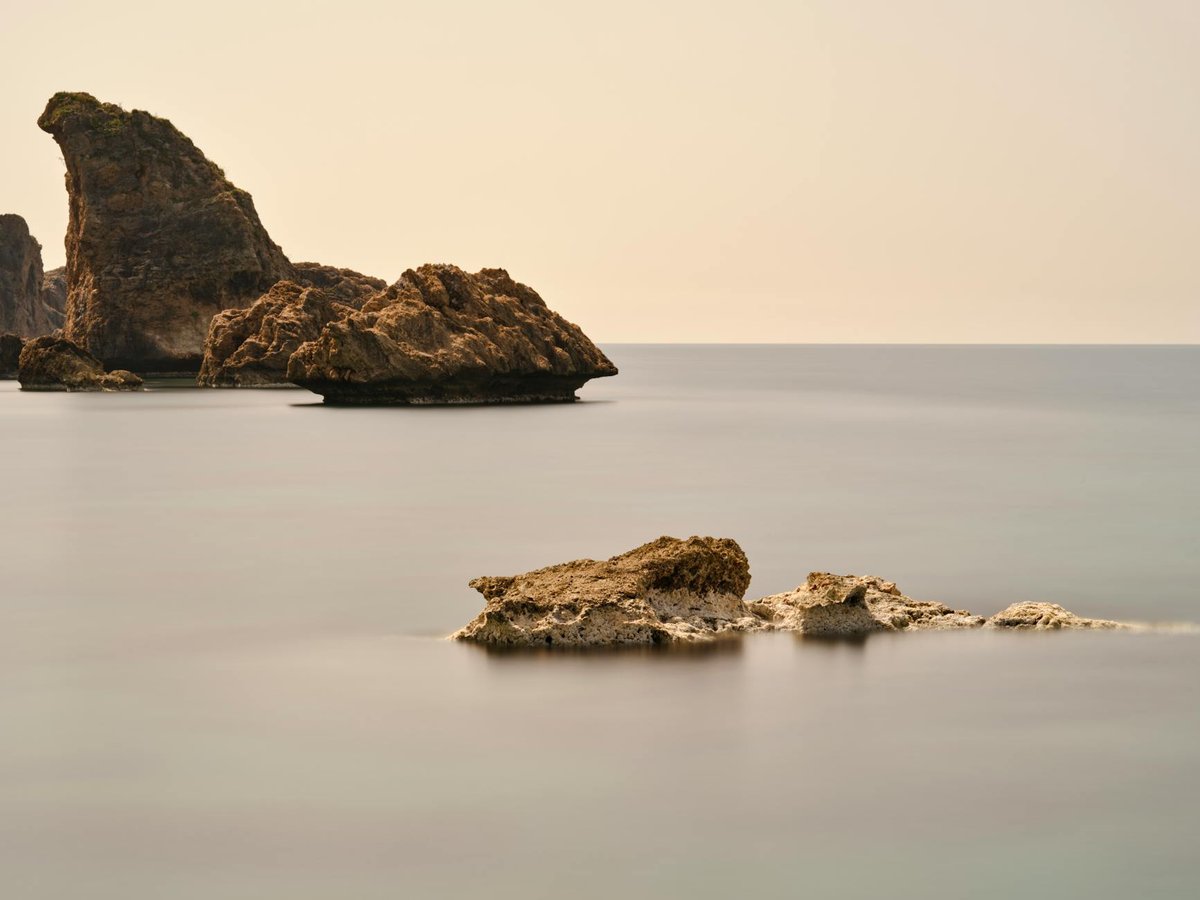
Seascapes benefit from 15-30 second exposures that reduce waves to an ethereal mist around stationary rock formations
Cloud Streaking and Sky Motion
A 10-stop ND filter on a windy day transforms clouds from static cotton balls into dramatic directional streaks. The visual effect implies speed, power, and the passage of time.
Optimal Conditions
- Fast-moving mid-altitude clouds: Cumulus and stratocumulus clouds move quickly enough to streak in 30-120 seconds
- Mixed sky: Partly cloudy skies produce the most dramatic results, with streaked clouds against patches of smooth blue
- Wind direction: Clouds moving toward or away from camera create radiating lines (stronger composition). Clouds moving across the frame create parallel streaks.
Settings for Cloud Streaking
| Condition | Filter | Aperture | ISO | Shutter | Result |
|---|---|---|---|---|---|
| Bright overcast | 10-stop | f/11 | 100 | 30-60 sec | Moderate streaks |
| Partly cloudy, sun | 10-stop | f/16 | 100 | 15-30 sec | Defined streaks with texture |
| Cloudy, flat light | 6-stop | f/11 | 100 | 4-15 sec | Subtle movement |
| Windy, dramatic | 10-stop | f/11 | 100 | 60-120 sec | Maximum streak length |
Light Trail Photography
Vehicle light trails are the urban equivalent of waterfall silk — trails of color carved through the frame by moving headlights and taillights.
Settings
- Aperture: f/8-f/11 for sufficient depth of field
- ISO: 100 to keep exposures long
- Shutter: 10-30 seconds depending on traffic speed and density
- Timing: Blue hour is ideal — ambient light fills the sky with color while vehicle lights are already bright
Composition Strategy
Find a vantage point where roads curve or converge. S-curves and roundabouts create the most dynamic trails. Elevated positions (bridges, parking garages, hillsides) add depth. Include architectural context — light trails without buildings or landmarks are abstract noise.
Stacking for Density
A single 30-second exposure captures whatever traffic passes during that window. For denser, more complex trail patterns, capture 10-20 sequential exposures and stack them in Photoshop using “Lighten” blend mode. Each exposure adds its light trails while the static scene remains unchanged.
Star Trails
Single Exposure Method
The traditional approach: open the shutter for 30 minutes to several hours and let the Earth’s rotation paint arcs across the sensor.
| Setting | Value | Notes |
|---|---|---|
| Aperture | f/2.8 - f/4 | Wide open or near it |
| ISO | 200 - 400 | Low to manage noise over long duration |
| Shutter | 30 - 120 minutes | Longer = longer arcs |
| Focus | Manual, on bright star | Use live view magnification |
| White balance | 3800-4200K | Keeps sky neutral |
Advantages: Single file, no stacking required, natural appearance.
Disadvantages: Hot pixels accumulate, one airplane ruins the exposure, no mid-shoot corrections, battery drain.
Stacking Method (Recommended)
Capture 100-300 sequential exposures at 20-30 seconds each, then stack them in software like StarStax (free) or Photoshop.
Workflow:
- Set intervalometer: 25-second exposure, 1-second gap, 200+ frames
- Start sequence, monitor first few frames for focus and exposure
- Import to StarStax, select “Lighten” blend mode
- Export combined image
Advantages: Lower noise per frame, airplane and satellite removal (delete affected frames), mid-shoot correction possible, battery swap between sequences.
Disadvantages: Gaps between frames create dashed rather than continuous trails (minimize with short intervals), requires post-processing.
Finding Polaris for Circular Trails
In the Northern Hemisphere, compose with Polaris (the North Star) in frame. Star trails will form concentric circles around this point. Use PhotoPills or Stellarium to locate Polaris precisely. In the Southern Hemisphere, the south celestial pole (near the star Sigma Octantis) serves the same function but is much fainter — use an app to find it.
Intentional Camera Movement (ICM)
ICM is long exposure’s rebellious cousin. Instead of keeping the camera perfectly still, you deliberately move it during exposure to create abstract, painterly images.
Basic Technique
- Set shutter speed to 1/4 - 2 seconds (use ND filter if needed in bright conditions)
- Choose a direction of movement that complements the scene (vertical for trees, horizontal for seascapes)
- Begin the movement before pressing the shutter, or press first and move smoothly
- Keep the motion smooth and consistent — jerky movement creates jarring results
ICM Subjects That Work
- Forest: Vertical pan through tree trunks creates a painterly, impressionist effect
- Flowers: Gentle circular or vertical movement produces color-field abstractions
- Seascapes: Horizontal pan along the horizon blends water and sky
- Autumn foliage: Any direction produces warm color abstractions
- Architecture: Vertical pan along tall buildings creates urban abstractions
The 90% Failure Rate
ICM is inherently unpredictable. Expect to shoot 50-100 frames to get 5-10 keepers. This is normal and part of the process. Bryan Peterson covers this approach in Understanding Exposure — the willingness to experiment and accept failure is what separates creative photographers from technicians.
Common Long Exposure Mistakes
Color Cast from ND Filters
Most ND filters introduce some color shift, particularly in the 10-stop and above range. Always shoot RAW so you can correct white balance in post. Even high-quality filters may shift slightly magenta or brown at extreme densities.
Soft Images from Vibration
The most common cause of soft long exposures is not focus error — it is vibration. Sources include:
- Wind on the tripod: Hang weight, use a lower tripod position, or shield with your body
- Shutter shock: Use electronic front curtain shutter or mirror lockup (DSLR)
- Image stabilization: Turn it OFF on a tripod. IS systems can introduce micro-vibration when the camera is already stationary.
- Filter manipulation: Do not touch the filter or lens during exposure
Hot Pixels
Exposures beyond 30 seconds often reveal hot pixels — bright colored dots caused by sensor heat. Enable in-camera long exposure noise reduction (LENR), which captures a dark frame of equal duration and subtracts hot pixels. The cost: doubled capture time. A 4-minute exposure becomes 8 minutes total. For star trail stacking, leave LENR off and remove hot pixels with a single dark frame in post-processing.
Overexposure in Highlights
It is easy to blow highlights during long exposures because you cannot see the accumulation in real time. Check your histogram after each shot. If highlights are clipped, reduce exposure time or add density (smaller aperture or lower ISO). Clipped highlights in a long exposure cannot be recovered.
Exercises
Exercise 1: The Duration Series
Find a waterfall or stream. Photograph it at 1/500, 1/15, 1/2, 2 seconds, 8 seconds, and 30 seconds. Compare the results side by side. Identify your personal preference for water rendering — this becomes your default starting point for future waterfall encounters.
Exercise 2: Cloud Speed Calibration
On a partly cloudy day with moderate wind, set up with a 10-stop ND filter aimed at the sky. Shoot at 15, 30, 60, and 120 seconds. Study how cloud speed and altitude affect streaking at each duration. This calibrates your intuition for field conditions.
Exercise 3: ICM Forest Walk
In a forest with tall, straight trunks, set your shutter to 1/2 second and pan vertically. Shoot 50 frames, varying your pan speed and direction. Select the top 5 and analyze what made them work. Speed? Starting position? Color?
Exercise 4: Light Trail Composition
Find an urban vantage point overlooking a road curve or intersection. Capture 15 individual 30-second exposures over 10 minutes. Stack them in Photoshop using Lighten blend mode. Compare the stack to any single frame — notice how density of trails changes the image’s energy.
Conclusion
Long exposure photography rewards patience, precision, and a willingness to slow down in a world that rewards speed. The technical foundations — filter selection, exposure calculation, vibration management — are non-negotiable prerequisites. Master them until they are automatic, because the magic of this discipline is not in the math. It is in the moment you look at your LCD and see a world the naked eye could never perceive: time made visible, motion made tangible, a thirty-second slice of reality compressed into a single frame.
Carry your filters. Carry your tripod. And carry the patience to stand in one spot while the world moves around you.
Put it to work — Practise these techniques on the seascapes of the Great Ocean Road guide and the waterfalls and blowholes of the New Zealand West Coast & North Island guide.